



TreeSize Free is a popular disk space analyzer for Windows. It helps users visualize and manage their computer’s storage. It quickly scans hard drives, network drives, and even mobile devices. This show which files and folders are taking up the most space. This is incredibly useful for anyone who’s ever wondered why their hard drive is full and needs to free up some precious disk space. TreeSize Free presents the data in an intuitive, Explorer-like interface. Making it easy to see and manage the largest “space hogs” on your system.
The software is an essential tool for anyone wanting to maintain a clean and efficient computer. By identifying large and old files, duplicate data, and temporary clutter, it empowers you to make informed decisions about what to delete, move, or archive. This can not only free up storage but also improve your PC’s overall performance. It’s a fast, lightweight application that can be run directly from a USB drive, making it a perfect portable solution for troubleshooting on the go.
Compatibility
TreeSize Free is a Windows-exclusive application and is compatible with a wide range of Windows operating systems. The latest versions support Windows 11 and Windows 10 (version 1809 or later), as well as Windows Server 2022, 2019, and 2016. For users with older systems, the developer provides legacy versions of the software that are compatible with older operating systems like Windows 7, 8.1, and even Windows Vista, though these older versions may not include the latest features and security updates.
Key Features
TreeSize Free Folder Size Visualization

One of the most powerful features of TreeSize Free is its ability to provide a detailed, hierarchical view of your storage. It displays the size of all subfolders, giving you a clear, descending order of all files and folders according to size. This eliminates the guesswork of traditional file explorers and immediately highlights where most of your data resides.
TreeSize Free Treemap Chart

For a more visual experience, TreeSize Free includes a treemap chart. This chart uses a series of nested rectangles. Each one represent folders and files, with the size of each rectangle corresponding to the amount of disk space it occupies. It offers a clear, at-a-glance overview of your disk usage. And helps you quickly spot large data clusters.
TreeSize Free Context Menu Integration
TreeSize Free integrates seamlessly with the Windows Explorer context menu. By right-clicking on any drive or folder, you can directly launch the application to scan that specific location. This makes it incredibly easy to perform quick analyses. Temoving the need to open the program and manually navigate to the desired path.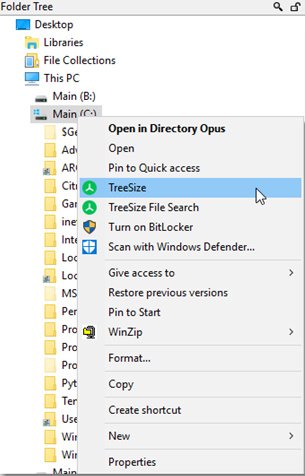
TreeSize Free Pro Version Features
While TreeSize Free is excellent for personal use. The Professional version offers a more robust set of features for power users and businesses. This includes the ability to find and deduplicate files, compare snapshots of disk usage over time. This also helps generate detailed reports in various formats like Excel, PDF, and HTML. The Pro version also supports scanning network drives in Windows domains. It provides advanced file search functionality with multiple filter attributes. Making it an indispensable tool for network administrators.
TreeSize Free is a must-have utility for anyone looking to get a handle on their computer’s storage. Its straightforward interface, fast scanning, and visual charts make it easy to identify and clear out space-hogging files. While the free version provides all the essential tools for personal use, the Professional version adds powerful features that are ideal for more complex storage management tasks in corporate environments.